Keypup MCP Server: Bring Engineering Analytics to Any AI Assistant
TL;DR: The Keypup MCP Server transforms how engineering teams access and analyze their SDLC data by bringing engineering analytics directly into your favorite AI assistant.
- Key Point 1: Query your engineering data from Claude, ChatGPT, Cursor, VSCode, or any MCP-compatible client using natural language—no code required.
- Key Point 2: The AI automatically orchestrates multiple tools to fetch, analyze, and present your data, handling complex queries that would normally require SQL expertise.
- Key Point 3: Part of the rising Model Context Protocol trend that's revolutionizing how AI assistants access structured data and enterprise tools.
- Key Point 4: Setup takes minutes: add the server URL to your AI client, approve the one-click OAuth connection in your browser (or use an API token if your client needs one), and start asking questions.
Introduction: The Rise of the Model Context Protocol
Imagine asking Claude, ChatGPT, or your favorite AI assistant: "What was our average PR cycle time last month?" and getting an instant, accurate answer pulled directly from your unified Git and Jira data. No dashboard to build. No SQL to write. No switching contexts.
This is the promise of Model Context Protocol (MCP)—and it's rapidly becoming the standard for how AI assistants interact with enterprise data and tools. Introduced by Anthropic in late 2024, MCP has exploded in adoption, with major AI platforms like OpenAI, Google, and Mistral AI embracing the protocol. The reason is simple: MCP solves the "last mile" problem of AI—giving assistants secure, standardized access to your company's structured data.
For engineering teams, this represents a fundamental shift. Instead of logging into yet another analytics platform, you can simply ask your questions where you already work—in your code editor, in your AI chat window, or even in your terminal. The data comes to you, contextualized by an AI that understands both your question and your domain.
Today, we're thrilled to announce that Keypup is now MCP-enabled. Our new MCP server brings the full power of Keypup's unified engineering analytics directly into any MCP-compatible AI client, letting you query SDLC metrics, drill into bottlenecks, and explore your data using plain English.
Context: Why MCP Servers Are Transforming Engineering Workflows
The software development landscape is drowning in tools. The average engineering team uses 10+ platforms: GitHub or GitLab for code, Jira or Linear for project management, Slack for communication, and specialized analytics tools like Keypup for understanding performance. Each tool has its own interface, its own query language, its own way of presenting data.
This fragmentation creates friction. When a VP of Engineering wants to understand why delivery is slowing down, they need to:
- Log into their analytics platform
- Navigate to the right dashboard (or build a new one)
- Configure the right filters and timeframes
- Export or screenshot the results
- Context-switch back to where they were working
By the time they have their answer, they've lost 10 minutes and broken their flow.
I spend more time in our analytics tool trying to answer simple questions than I do actually fixing the problems. By the time I figure out how to build the right query, I've forgotten why I was even looking at it. I just want to ask 'why are we slow?' and get an answer.
This is where Model Context Protocol shines. MCP creates a standardized bridge between AI assistants and structured data sources. Instead of building custom integrations for every AI platform, tool providers like Keypup can implement one MCP server that works with every MCP-compatible client.
For engineering leaders, the value proposition is immediate:
- Context preservation: Ask questions without leaving your workflow
- Natural language interface: No query languages or dashboard configuration
- AI orchestration: The assistant handles the complexity of multi-step queries
- Iterative refinement: Follow-up questions build on previous context
The MCP trend is accelerating rapidly, with more developer tools and AI clients adding MCP support every month. The protocol is becoming as fundamental to AI-powered development as REST APIs were to the web.
Keypup's MCP server positions your engineering team at the forefront of this shift.
What the Keypup MCP Server Can Do
The Keypup MCP Server exposes a focused toolkit that lets AI assistants explore and query your engineering data autonomously. Think of it as giving Claude, ChatGPT, or Cursor direct access to your Keypup analytics—but with the AI handling all the complexity.
When you connect the Keypup MCP Server to your AI client, seven read-only tools become available. Six of them are described below, and the seventh, query generation, gets its own section.
1. Discover Your Companies Lists the Keypup companies (teams/organizations) you belong to, along with the apps each team has connected. This is always the first step—queries need to know which company's data to analyze.
2. Read Your Team's AI Instructions Retrieves the AI Instructions your team wrote in its Keypup settings (your conventions, definitions and vocabulary), so the assistant starts every conversation with the same context as the in-app AI Agent.
3. Explore Datasets Browse the six available datasets: issues & pull requests, commits (attached to pull requests), comments, reviews, activity events, and AI usage (daily usage of AI coding assistants such as GitHub Copilot). Each dataset represents a different facet of your development lifecycle, and the AI can examine all of them to determine the best data source for your question.
4. Discover Formula Operators Lists the functions and operators available when building metrics, dimensions, and filters. This gives the AI a complete vocabulary for constructing precise queries—from date functions like YEAR_MONTH() to aggregators like COUNT() and AVG().
5. Explore Dataset Fields For any chosen dataset, this tool reveals all available fields (columns), their types (string, number, date, array), and their descriptions. The AI can search for specific fields by pattern, making it easy to find exactly what it needs—even custom Jira fields unique to your organization.
6. Run Reporting Queries Executes structured queries with metrics (aggregations), dimensions (group-by), filters, sorting, and pagination. Each query runs on one dataset; when a question spans several, the assistant runs several queries and combines the results. This is where the AI actually fetches your data and brings back rows, which your AI assistant then summarizes or turns into a chart.
The Secret Weapon: AI-Powered Query Generation
Here's where it gets powerful. In addition to the six tools above, Keypup's MCP server includes a query generation tool that leverages AI to translate your natural language request into a ready-to-run structured query.
This means the AI assistant doesn't just have access to your data—it has access to another AI that specializes in building Keypup queries. It's AI orchestrating AI, and the result is remarkably sophisticated query construction without any manual intervention.
How a Query Actually Works
Let's trace what happens when you ask: "Show me our merged PRs by repository over the last quarter."
Behind the Scenes: AI Orchestration Flow
Step 1: AI calls list_companies → Gets your company ID (and reads your team's AI Instructions with get_company_ai_instructions) Step 2: AI calls list_datasets → Identifies ISSUES_PULL_REQUESTS as the right dataset Step 3: AI calls list_dataset_fields → Finds fields like merged_at, project, type, state Step 4: AI calls generate_dataset_query → Gets a structured query:
{
  "dataset": "ISSUES_PULL_REQUESTS",
  "metrics": [
    { "label": "Merged PRs", "formula": "COUNT()" }
  ],
  "dimensions": [
    { "label": "Week", "formula": "YEAR_WEEK(merged_at)", "sort": "DESC" },
    { "label": "Repository", "formula": "project" }
  ],
  "filters": [
    { "formula": "type == \"pull_request\" && state == \"MERGED\" && merged_at >= NOW() - 3 * MONTH()" }
  ]
}
Step 5: AI calls query_dataset → Executes the query and gets results
Step 6: AI formats the results → Presents a clean summary with the data table
All of this happens in seconds. From your perspective, you asked a question and got an answer. But under the hood, the AI orchestrated 5-6 tool calls, built a sophisticated query with proper filters and aggregations, and formatted the results in a human-readable way.
This is the power of MCP: giving AI assistants the tools they need to be truly autonomous agents over your data.
Real-World Questions You Can Ask
Once the Keypup MCP Server is connected, your AI assistant becomes a conversational interface to your entire engineering analytics platform. Here are real examples of questions teams are asking:
Delivery & Throughput Insights
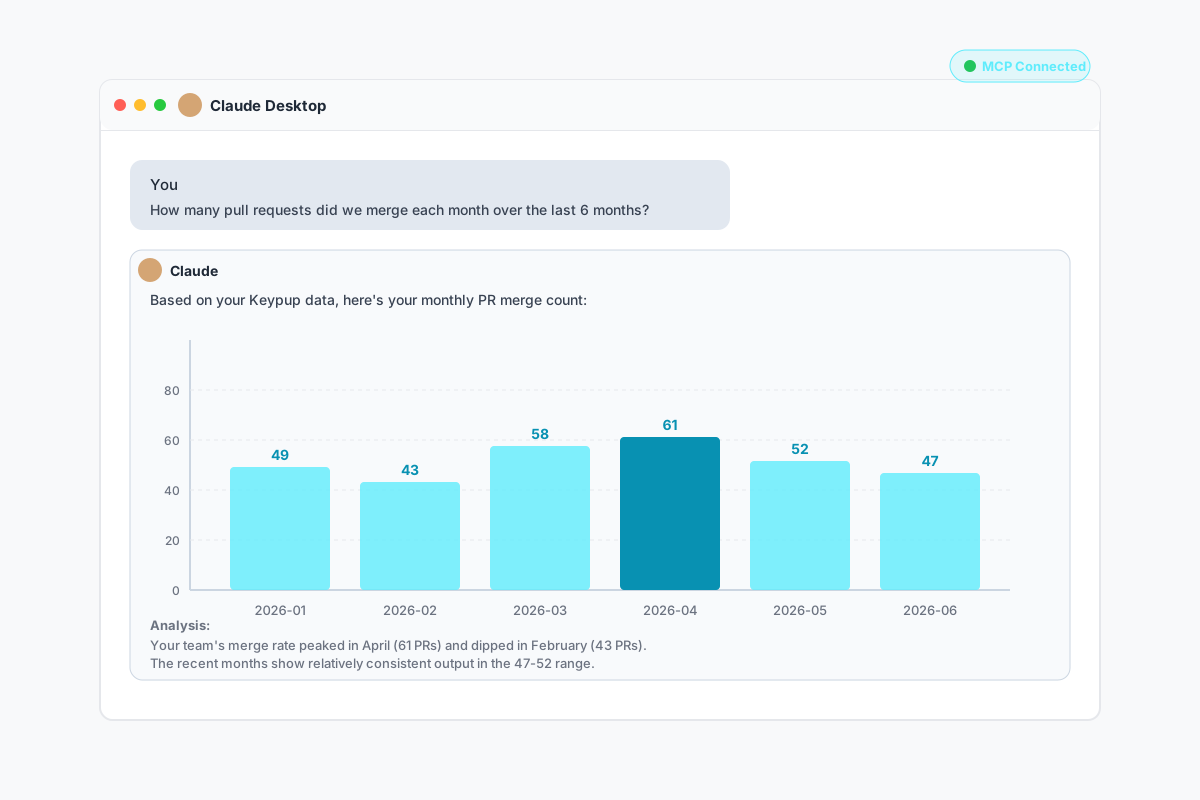
"How many pull requests did we merge each month over the last 6 months?"
Typical Response from Claude with Keypup MCP
Based on your Keypup data, here's your monthly PR merge count for the last 6 months:
| Month | Merged PRs |
|---|
| 2026-06 | 47 |
| 2026-05 | 52 |
| 2026-04 | 61 |
| 2026-03 | 58 |
| 2026-02 | 43 |
| 2026-01 | 49 |
Analysis: Your team's merge rate peaked in April (61 PRs) and dipped in February (43 PRs). The recent months show relatively consistent output in the 47-52 range.
Other common throughput questions:
- "What's our weekly issue closing rate this quarter?"
- "How many commits were made per author last month?"
- "Show me story points completed by sprint over the last 6 sprints."
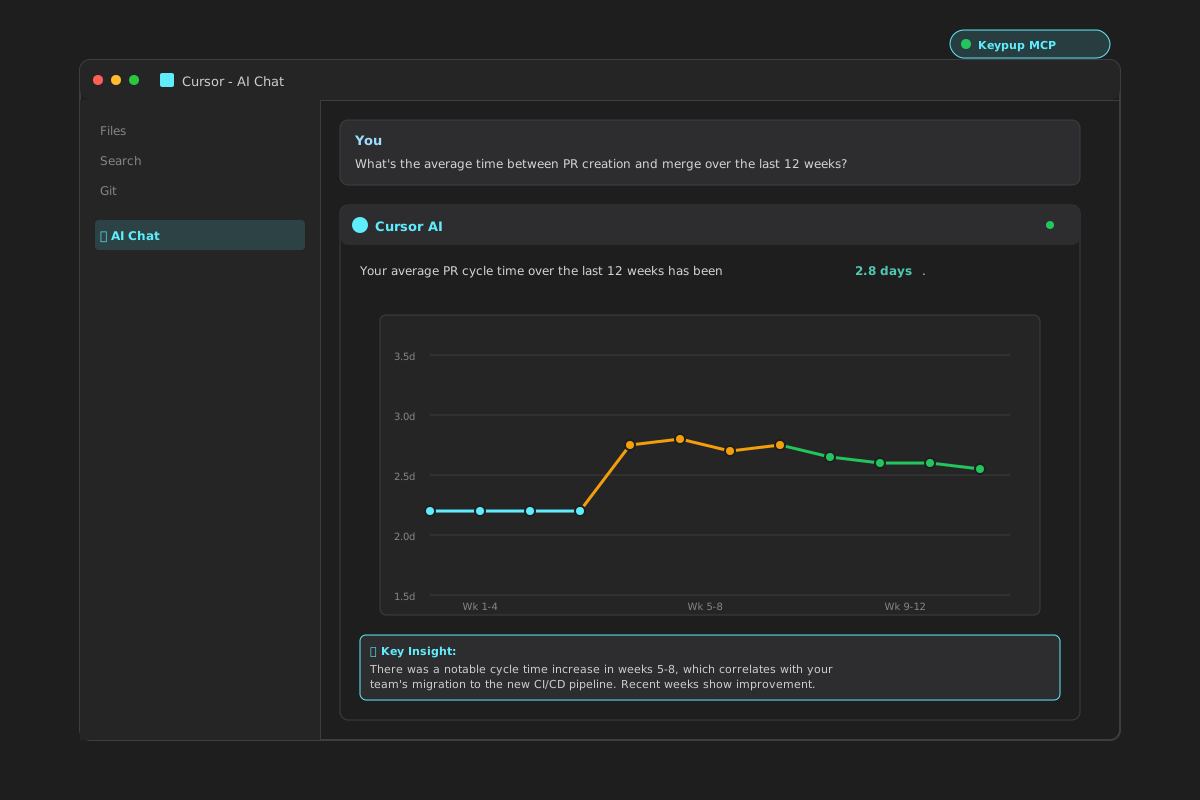
"What's the average time between PR creation and merge over the last 12 weeks?"
Typical Response from Cursor with Keypup MCP
Your average PR cycle time over the last 12 weeks has been 2.8 days.
Trend breakdown:
- Weeks 1-4: 2.3 days (baseline)
- Weeks 5-8: 3.1 days (+35% spike)
- Weeks 9-12: 2.9 days (slight improvement)
Key insight: There was a notable cycle time increase in weeks 5-8, driven by longer waits for a first review on larger pull requests. The recent weeks show improvement as review pickup times came back down.
Other performance questions:
- "Which repositories have the slowest cycle time?"
- "Show me review turnaround time trend for the last 3 months."
- "What's the correlation between PR size and time to merge?"
Quality & Process Questions
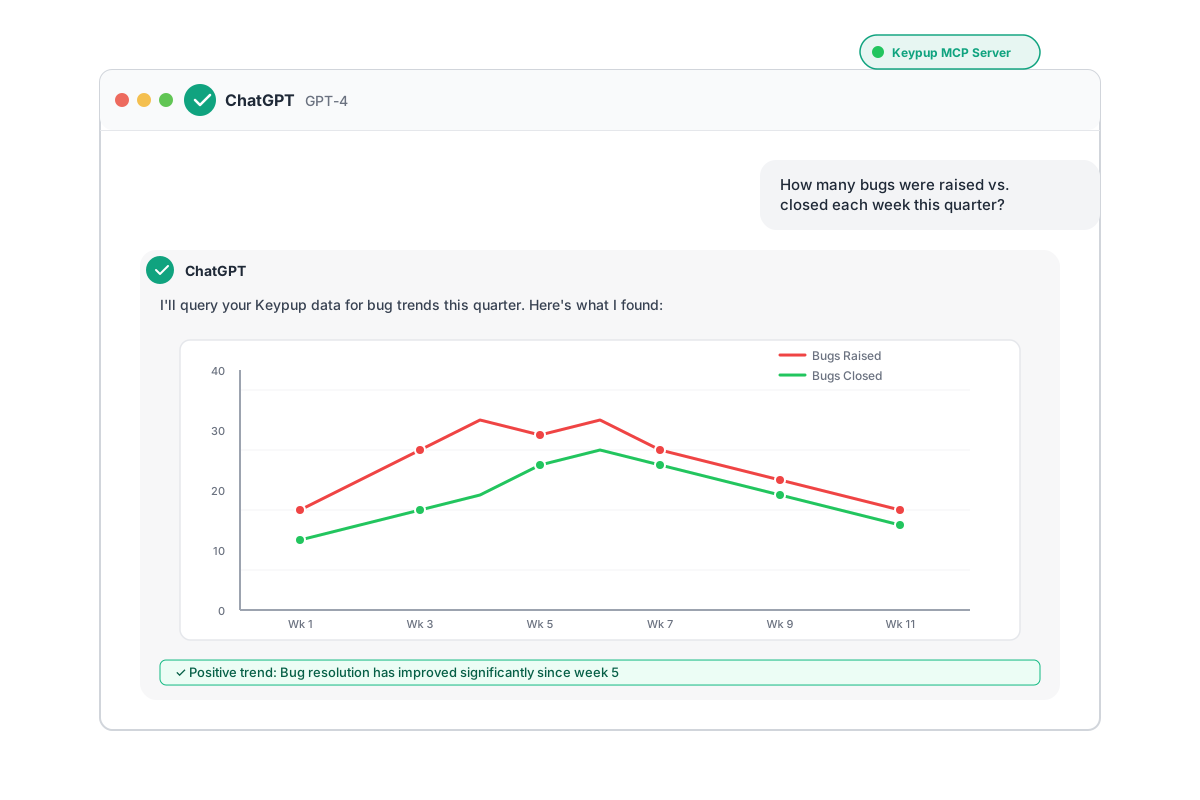
"How many bugs were raised vs. closed each week this quarter?"
Other quality questions:
- "What proportion of our pull requests resolve at least one issue?"
- "How many PRs were merged without a review?"
- "Show me our change failure rate by week, counting merged PRs labeled hotfix as failures." (Keypup has no deployment or incident data of its own: by default a merged PR counts as a deployment, and failures follow the convention you define, such as bug or hotfix labels.)
AI Adoption & Usage
"Which models do our engineers use most, and has our GitHub Copilot suggestion acceptance rate improved this quarter?"
The AI usage dataset holds daily usage metrics from AI coding assistants (GitHub Copilot today, with Claude Platform and OpenAI in beta): interactions, suggestion acceptance, credits consumed and code contribution, broken down by user, model, surface and language. Your assistant can query it next to your pull request data to compare adoption with delivery.
Workload & Collaboration Insights
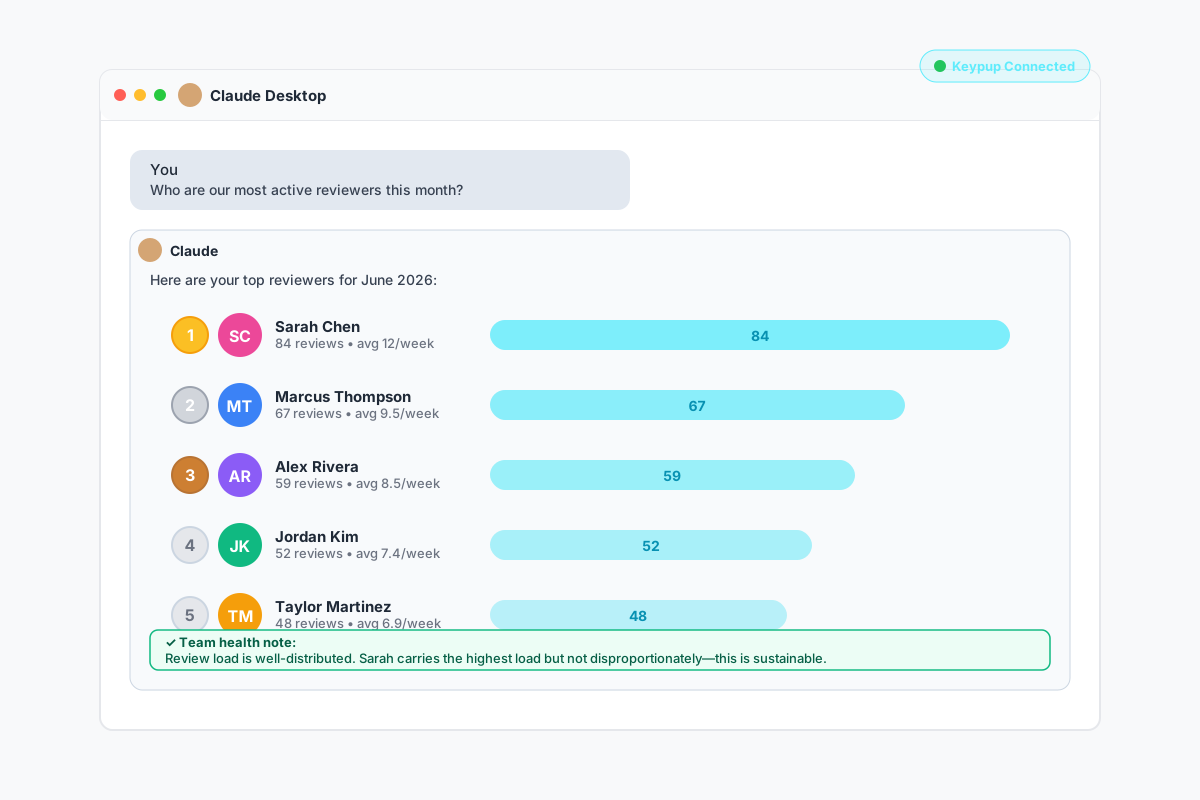
"Who are our most active reviewers this month?"
Typical Response from Claude with Keypup MCP
Here are your top reviewers for June 2026:
- Sarah Chen - 84 reviews (avg 12/week)
- Marcus Thompson - 67 reviews (avg 9.5/week)
- Alex Rivera - 59 reviews (avg 8.5/week)
- Jordan Kim - 52 reviews (avg 7.4/week)
- Taylor Martinez - 48 reviews (avg 6.9/week)
Team health note: Your review load is well-distributed across your senior engineers. Sarah is carrying the highest load but not disproportionately—consider this sustainable.
Other collaboration questions:
- "How is work distributed across the team right now?"
- "How many comments do our pull requests receive on average?"
- "Which PRs have been waiting for review the longest?"
Open-Ended Exploration
The beauty of natural language is that you don't need to know the exact query to ask. You can explore broadly:
- "Summarize our engineering activity over the last month."
- "Compare open vs. closed issues over time."
- "What labels are most common on our issues?"
- "Are there any unusual patterns in our commit activity?"
And because the conversation is iterative, you can refine:
- "Now break that down by repository."
- "Restrict it to the backend team."
- "Show me only critical bugs."
The AI maintains context across the conversation, making data exploration feel natural rather than mechanical.
Setting Up the Keypup MCP Server in 3 Steps
The entire setup process takes less than 5 minutes. The MCP Setup page in the Keypup sidebar gives the instructions for each AI client, with screenshots. Here's how:
Step 1: Choose How to Authenticate
The Keypup MCP Server lives at https://hq.keypup.io/mcp and supports two authentication methods:
OAuth 2.1 (recommended): your AI client opens Keypup in your browser, you approve the connection, and you're done. There is no token to copy, store or rotate. Claude and VS Code register themselves automatically, and Cursor and Kiro are pre-registered.
API token: for clients that don't support OAuth. In Keypup, go to Settings → Account → API Token, click Create token, give it a descriptive name (e.g., "MCP - Claude Desktop") and an expiration date, then select the scopes:
- Get started quickly:
mcp:read and mcp:write - Or use fine-grained access:
hq:companies:read at the very least, plus the API scopes relevant to what you plan to query (such as viz:reports:read)
Click Create and copy the token immediately (it's only shown once).
Security Tip: Prefer OAuth whenever your client supports it. If you use an API token, set an expiration, grant only the scopes you need, and treat the token like a password—never commit it to version control.
For Claude and Claude Code: add a custom connector (or MCP server) and enter the server URL https://hq.keypup.io/mcp. Claude opens a browser window to sign in to Keypup and authorize access.
For ChatGPT: open the Keypup app in the ChatGPT app directory and click Connect. You can then call it with @Keypup in any conversation.
For VS Code: use the one-click install link in the help center, or add the server via JSON. VS Code registers itself and opens a browser window to authorize access:
{
  "servers": {
    "keypup": {
      "type": "http",
      "url": "https://hq.keypup.io/mcp"
    }
  }
}
For Cursor (mcp.json): the auth.CLIENT_ID field enables OAuth, and Cursor opens a browser window on first connection:
{
  "mcpServers": {
    "keypup": {
      "url": "https://hq.keypup.io/mcp",
      "auth": {
        "CLIENT_ID": "https://cursor.com"
      }
    }
  }
}
For Kiro (mcp.json):
{
  "mcpServers": {
    "keypup": {
      "url": "https://hq.keypup.io/mcp",
      "oauth": {
        "clientId": "https://kiro.dev",
        "redirectUri": "127.0.0.1:57517"
      }
    }
  }
}
For any other MCP client, with an API token:
{
  "mcpServers": {
    "keypup": {
      "url": "https://hq.keypup.io/mcp",
      "headers": {
        "Authorization": "Bearer YOUR_API_TOKEN_HERE"
      }
    }
  }
}
Replace YOUR_API_TOKEN_HERE with the token you generated in Step 1. Keep the Bearer prefix. The same headers block can replace the auth or oauth block in Cursor or Kiro if you prefer a token.
Step 3: Test the Connection
Restart or reconnect your MCP client, then try a simple test query:
"List my Keypup companies"
If the AI successfully returns your company names, you're connected! Try a more complex query:
"Show me PRs merged this week"
Success! You're Ready to Go
✅ The AI should return data from your Keypup account
✅ You can now ask any engineering analytics question
✅ The AI will automatically orchestrate the right tools to answer
The Benefits: Why This Changes Everything
1. Zero Context Switching
Engineering leaders and developers can stay in their flow. Writing code in Cursor? Ask about PR review metrics without opening a browser. Having a strategy discussion in Claude? Pull in real SDLC data to support your argument. The data comes to you.
2. No Query Language Expertise Required
You don't need to know SQL, GraphQL, or any proprietary query syntax. Natural language is the interface. This democratizes data access—junior developers can ask the same sophisticated questions as seasoned data analysts.
3. AI Handles the Complexity
The Keypup MCP Server doesn't just fetch data—it understands your schema. It knows which dataset to use for which question. It knows how to construct proper filters and aggregations. It even handles pagination and sorting automatically. You get all the power of Keypup's analytics engine without needing to understand how it works.
4. Iterative and Contextual
Unlike traditional dashboards where each query is isolated, MCP-enabled conversations are contextual. Ask a question, get an answer, then refine: "now show me just the backend team" or "break that down by repository." The AI maintains state across the conversation.
5. Works Everywhere
Because MCP is an open standard, Keypup's MCP Server works with any MCP-compatible client. Today the documented setups cover Claude and Claude Code, Cursor, VS Code, Kiro and ChatGPT (through the Keypup app), and any other client that speaks MCP can connect too. Tomorrow it could be a new AI assistant you haven't even heard of yet. You set up once and benefit everywhere.
6. Enterprise-Grade Security
Despite feeling conversational, the MCP Server maintains enterprise security standards:
- OAuth 2.1: Browser-authorized, scoped access with expiring tokens and no long-lived credential to manage
- Scoped permissions: An API token, if you use one, only grants the access you explicitly allow
- Read-only: All Keypup MCP tools are read-only and never modify your data
- Token expiration: Time-limited access with periodic rotation
- Data isolation: Queries are automatically scoped to your authorized companies
- Certified: Keypup is ISO 27001 and SOC 2 Type II certified (see trust.keypup.io)
You get the ease of natural language with none of the security compromises.
The Bigger Picture: MCP and the Future of Engineering Intelligence
The Keypup MCP Server is part of a larger shift in how engineering teams interact with their data. We believe the future of engineering intelligence isn't about better dashboards—it's about ambient intelligence: data that's always available, always contextual, and always conversational.
Imagine a near future where:
- Your IDE notices you're working on a slow-performing service and surfaces relevant performance metrics without you asking
- Your standup meeting automatically includes a verbal summary of yesterday's engineering activity
- Your quarterly planning sessions have an AI assistant that can instantly answer "what if" questions about capacity and velocity
This isn't science fiction. With MCP, the building blocks are already here. And Keypup is positioned at the intersection of unified SDLC data and conversational AI—the exact combination needed to make this future real.
Getting Started Today
The Keypup MCP Server is available now on paid plans: it is included in Full Platform Access, and the separate MCP & API plan (billed per bucket of 100,000 records, without dashboards) gives you the MCP server and the API on their own. See pricing for details. We're actively expanding its capabilities and welcome your feedback.
Ready to bring your engineering analytics to your AI assistant?
- Connect your AI client: open the MCP Setup page in the Keypup sidebar and follow the one-click OAuth instructions for your client (or create an API token if your client needs one)
- Read the full documentation: Using the MCP Server
- Join our community: Share your use cases and provide feedback via our in-app chat
If you're not yet a Keypup customer but want to experience the power of conversational engineering analytics, start your free trial today.
The era of dashboard-driven engineering intelligence is ending. The era of conversational, ambient intelligence is beginning—and with Keypup's MCP Server, you can be part of it from day one.
Have questions about the Keypup MCP Server? Our team is here to help. Reach out via the in-app chat or email us at contact@keypup.io.