Priority Inflation: When Everything Is P1, Nothing Is
When most of the backlog is marked Highest or High, priority stops deciding what gets worked on first. Learn what engineering leaders on Reddit say about "everything is P1", why priority inflation stays invisible in enterprise reporting, and how Keypup MCP reads Jira priority, workflow history and linked pull requests to measure it and clean it up.
Liam Davis
•13 min read
Table of Contents
TL;DR: In many enterprise organizations, more than half of new Jira issues are created as Highest or High priority. When that happens, priority stops changing what gets worked on: a High issue waits about as long to start as a Medium one, and thousands of "urgent" issues sit in the backlog untouched for months. The Keypup MCP Server reads the Jira Priority field, the workflow status history of every issue and the pull requests linked to it, so your AI assistant can measure your priority mix over time, compare wait time and work time at each level, map the never-started backlog by priority and age, compare teams, and list the stale "urgent" issues to re-rank or close.
Every enterprise backlog starts with a sensible priority scale. Highest means drop everything. High means next. Medium is the normal flow. Then, one escalation at a time, the scale drifts upward. A stakeholder learns that High gets picked up faster than Medium, so everything they file is High. A team lead sees their tickets lose out to someone else's High, so they raise theirs too. Within a year, the top two levels hold most of the backlog — and the label that was supposed to decide what happens next no longer decides anything.
The Friction: A Priority Scale Nobody Believes
Priority inflation — also called "everything is P1", priority creep or the urgency treadmill — is what happens when the share of work marked top priority keeps growing until priority stops being useful for ordering work.
It stays invisible for structural reasons:
Each escalation looks reasonable. Nobody marks an issue High without a reason. The problem only shows up in aggregate, and nobody looks at the aggregate.
Priority is set once and never revisited. An issue created as High eighteen months ago is still High today, even if nobody has touched it since. The backlog fills with old "urgent" items.
The real priority lives somewhere else. When the field stops working, teams move the real ordering into Slack threads, spreadsheets and hallway conversations. The tracker still shows a priority; it just isn't the one being used.
Reports average it away. Throughput and cycle-time reports rarely break down by priority, so leaders never see that High and Medium now behave the same way.
The result: leaders make roadmap and staffing decisions using a field that no longer reflects what the organization actually works on first.
Why This Matters: Inflated Priority Has Real Costs
The Signal Problem
The point of a priority field is to answer one question: what should we do next? When 60% of incoming work is top priority, the field can't answer it. Engineers pick from the top of a list where everything looks the same, and the truly urgent item waits behind items that only look urgent.
The Escalation Problem
When High no longer gets work started, requesters escalate again — to Highest, to a direct message, to a manager. Each escalation interrupts someone. The organization ends up running two priority systems: the official one in Jira and an unofficial one based on who complains loudest.
The Backlog Problem
Inflated priority hides stale work. An issue marked High that has waited 200 business days is either not important or badly neglected — and the backlog can't tell you which. Without a regular way to find these, the backlog keeps growing and planning gets harder every quarter.
The Enterprise Discussion: What Engineers Are Actually Saying
"Everything is P1" is one of the most common complaints wherever engineering managers, product leads and senior engineers at large organizations compare notes. The quotes below are representative of recurring threads on r/ExperiencedDevs, r/agile and r/projectmanagement.
Engineering Manager, Global Insurance Group (r/ExperiencedDevs)
"We have five priority levels and nobody has filed anything below High in a year. Sales escalates, support escalates, product escalates. My team just works from a Slack thread my director maintains, because the Jira priority means nothing anymore."
Senior Product Manager, Enterprise SaaS (r/agile)
"I tried to argue for re-ranking the backlog and was asked to prove it was a problem. How do you prove that a field has stopped working? I know it has, everyone knows it has, but there's no report that shows High and Medium get started at the same speed."
Staff Engineer, Large Logistics Platform (r/projectmanagement)
"We have hundreds of 'Highest' tickets older than a year. Some are done and nobody closed them, some are obsolete, some are actually important. Nobody will touch them because closing a Highest ticket feels like admitting something."
The pattern holds: teams know the priority scale has inflated, but nobody can show how far, what it costs, or which issues to fix first — because the evidence lives in the creation date, priority and status history of thousands of issues.
How Keypup MCP Measures Priority Inflation
The Keypup Model Context Protocol (MCP) Server gives your AI assistant structured access to the issues and pull requests Keypup imports from Jira, GitHub, GitLab and Bitbucket. For every Jira issue, that includes its Priority and other Jira fields (such as Team), its creation and closing dates, its current workflow status and sprint, its workflow timeline — each status it entered, with start and end timestamps — and the pull requests linked to it. That's everything needed to see how priority is assigned, how long work waits at each level, and which "urgent" issues have gone stale.
1. Sizing the Priority Inflation Problem
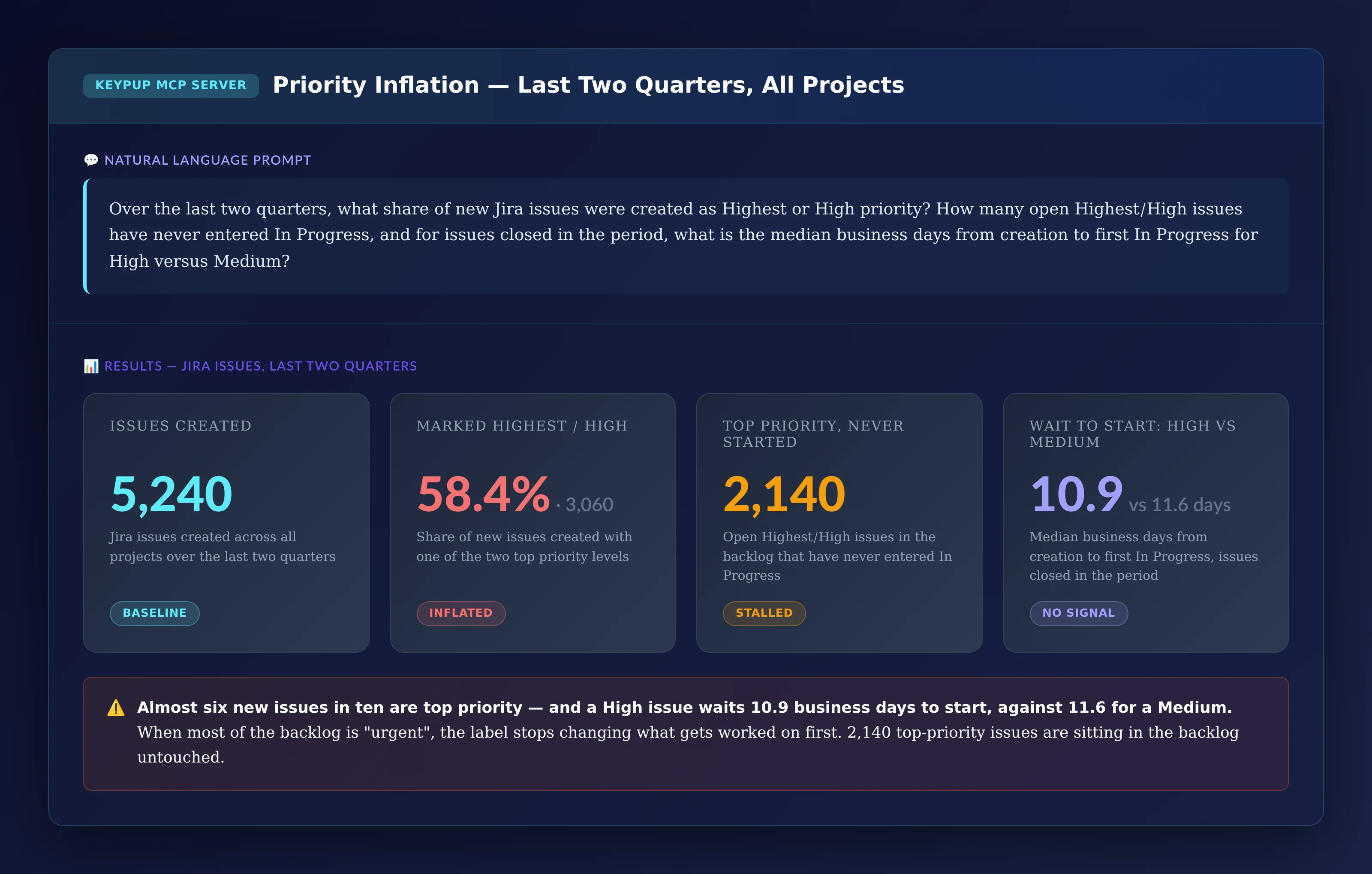
The first question is simple: how much of our new work is top priority, and does that priority still change anything?
MCP Prompt:
Over the last two quarters, what share of new Jira issues were
created as Highest or High priority? How many open Highest/High
issues have never entered In Progress, and for issues closed in
the period, what is the median business days from creation to
first In Progress for High versus Medium?
Output: Priority Inflation — Last Two Quarters, All Projects
Key Insight: Almost six new issues in ten are top priority, and a High issue waits a median 10.9 business days to start — against 11.6 for a Medium. The label no longer changes what gets worked on first. Meanwhile, 2,140 top-priority issues are sitting in the backlog, never started.
2. Proving the Drift Over Time
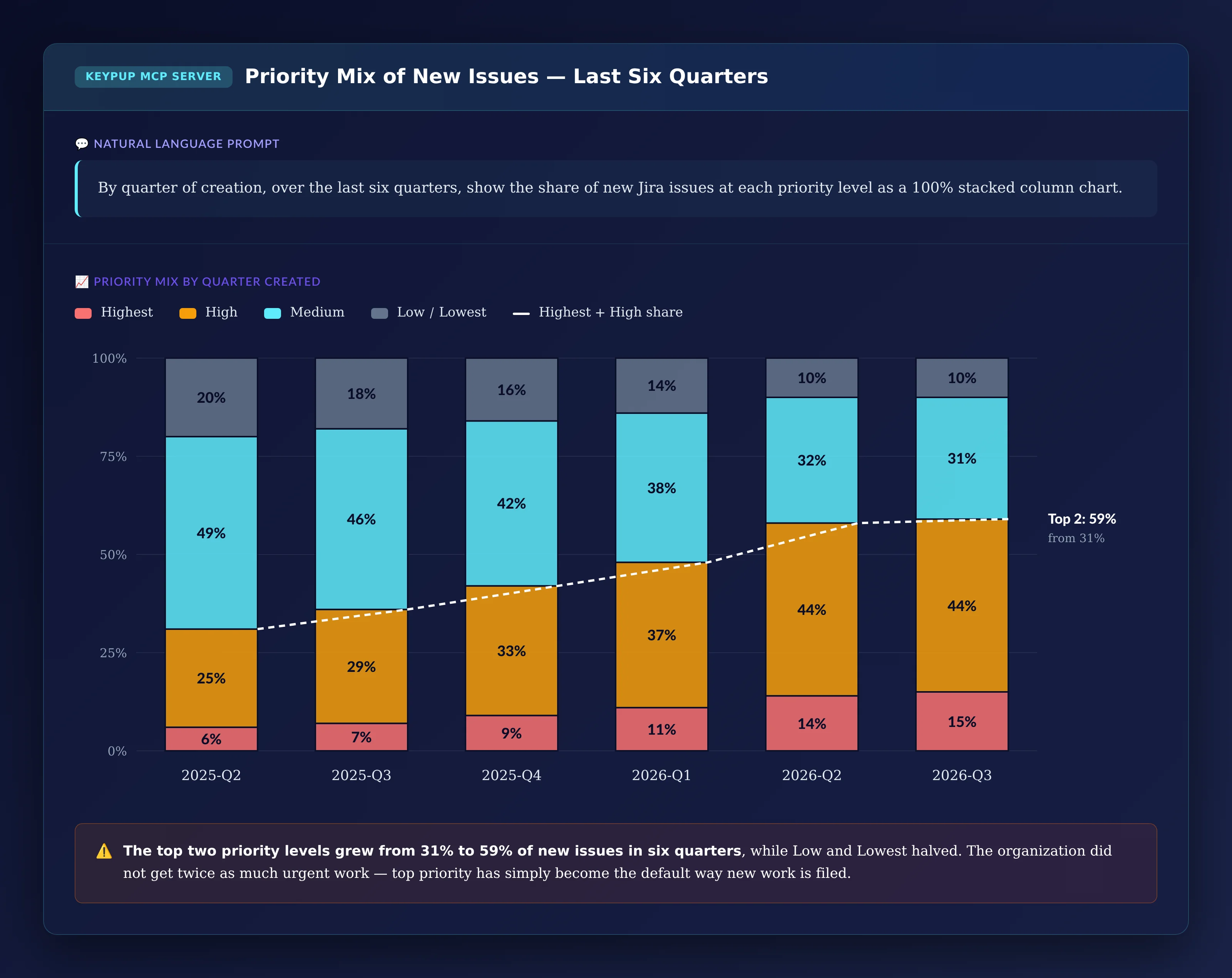
Leadership will ask whether this is a stable habit or a growing trend. The priority mix by quarter answers it.
MCP Prompt:
By quarter of creation, over the last six quarters, show the
share of new Jira issues at each priority level as a 100%
stacked column chart.
Output: Priority Mix of New Issues — Last Six Quarters
Key Insight: The top two levels grew from 31% to 59% of new issues in six quarters, while Low and Lowest halved. The organization didn't get twice as much urgent work — top priority has simply become the default way new work is filed.
3. Showing Where the Time Goes
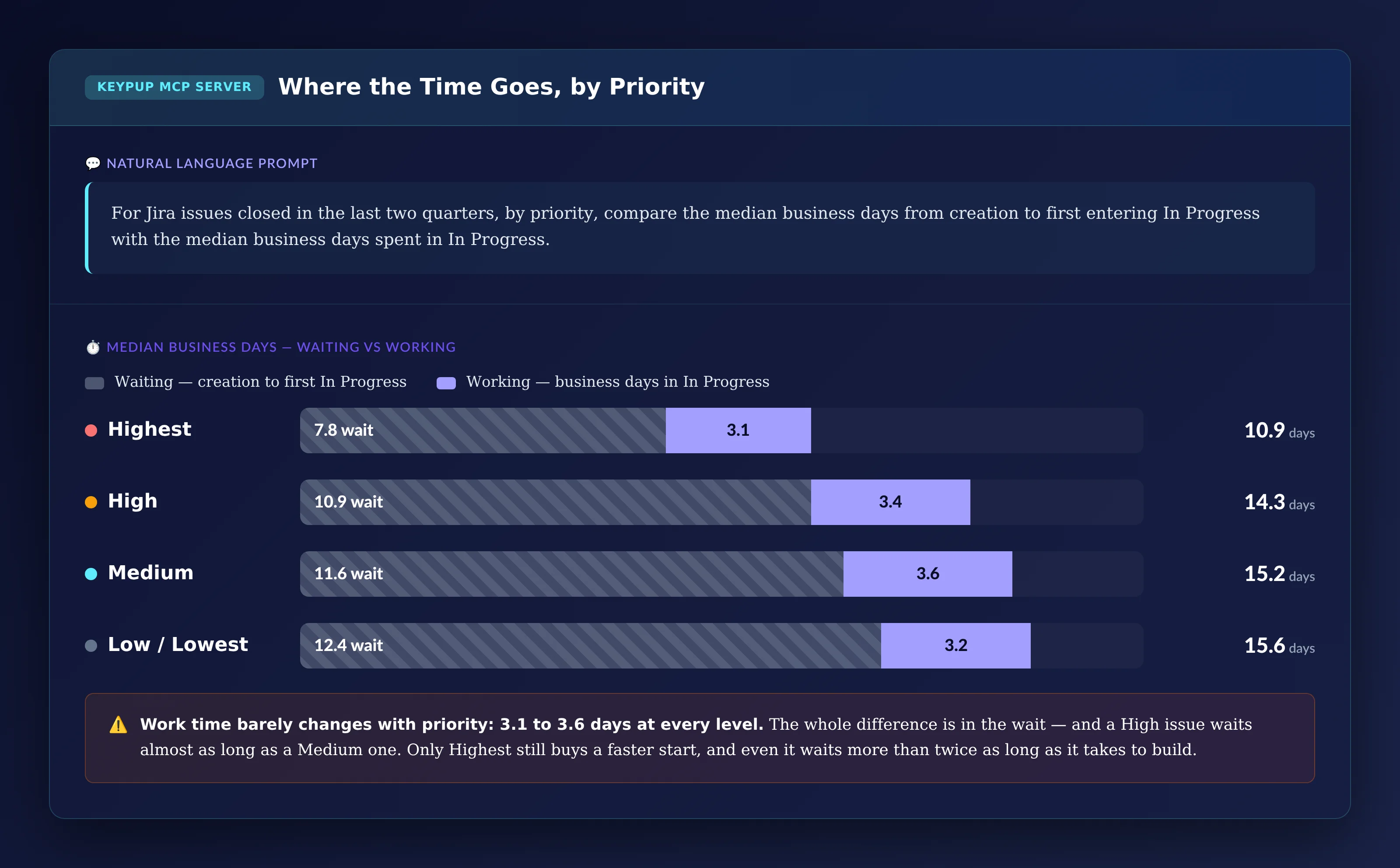
To make the case, leaders need to show that the cost of inflation is in waiting, not in the work itself.
MCP Prompt:
For Jira issues closed in the last two quarters, by priority,
compare the median business days from creation to first
entering In Progress with the median business days spent in
In Progress.
Output: Where the Time Goes, by Priority
Key Insight: Time spent in In Progress barely changes with priority — 3.1 to 3.6 business days at every level. The whole difference is in the wait, and a High issue waits almost as long as a Medium one. Only Highest still gets work started faster, and even Highest issues wait more than twice as long as they take to build.
4. Mapping the Stale "Urgent" Backlog
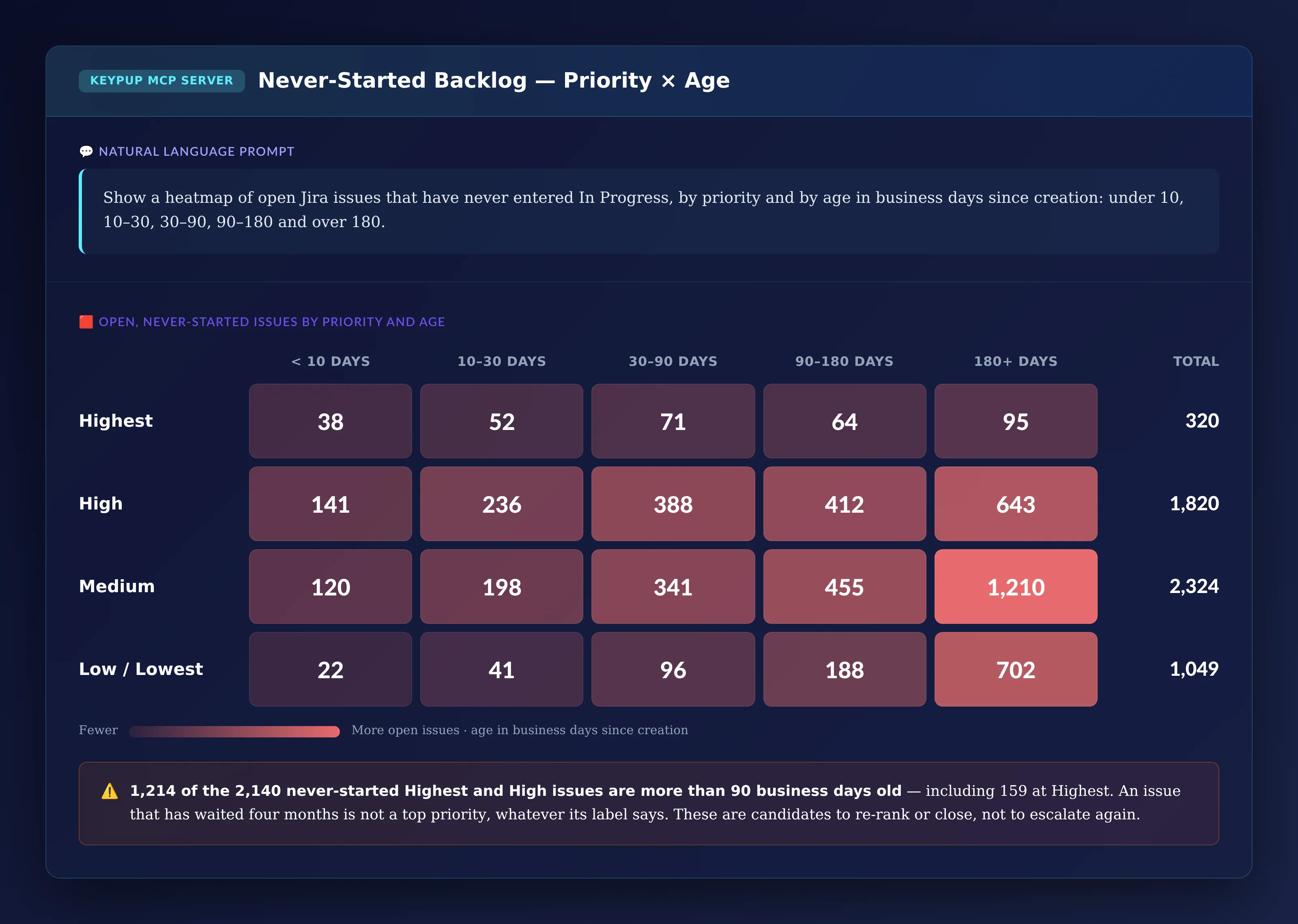
The next question is how much of the never-started top-priority backlog is still realistic, and how much has simply aged out.
MCP Prompt:
Show a heatmap of open Jira issues that have never entered In
Progress, by priority and by age in business days since
creation: under 10, 10–30, 30–90, 90–180 and over 180.
Output: Never-Started Backlog — Priority × Age
Key Insight: 1,214 of the 2,140 never-started Highest and High issues are more than 90 business days old, including 159 at Highest. An issue that has waited four months is not really a top priority, whatever its label says. These are the issues to re-rank or close — not to escalate again.
5. Comparing Teams
Is inflation everywhere, or concentrated in a few teams? The Jira Team field shows it.
MCP Prompt:
For each Jira Team, over the last two quarters, plot the share
of new issues created as Highest or High against the median
business days from creation to first In Progress for those
issues, sized by the number of open, never-started Highest/High
issues.
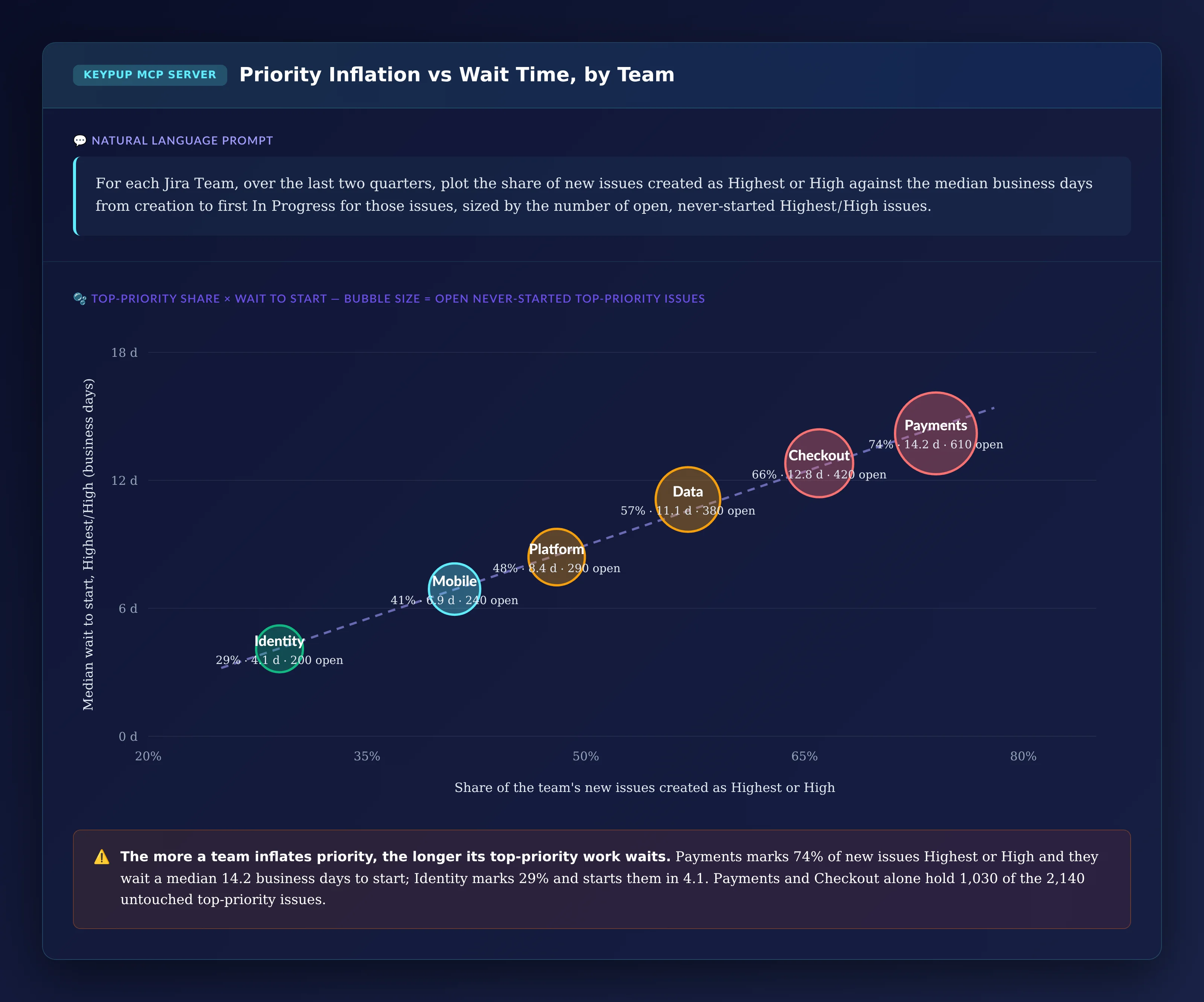
Output: Priority Inflation vs Wait Time, by Team
Key Insight: The more a team inflates priority, the longer its top-priority work waits. Payments marks 74% of new issues Highest or High, and they wait a median 14.2 business days to start. Identity marks 29% and starts them in 4.1. Payments and Checkout alone hold 1,030 of the 2,140 untouched top-priority issues — so the clean-up can start with two teams, not the whole organization.
6. Building the Re-Ranking List
For the next backlog review, leads need the specific issues to look at, with enough context to decide quickly.
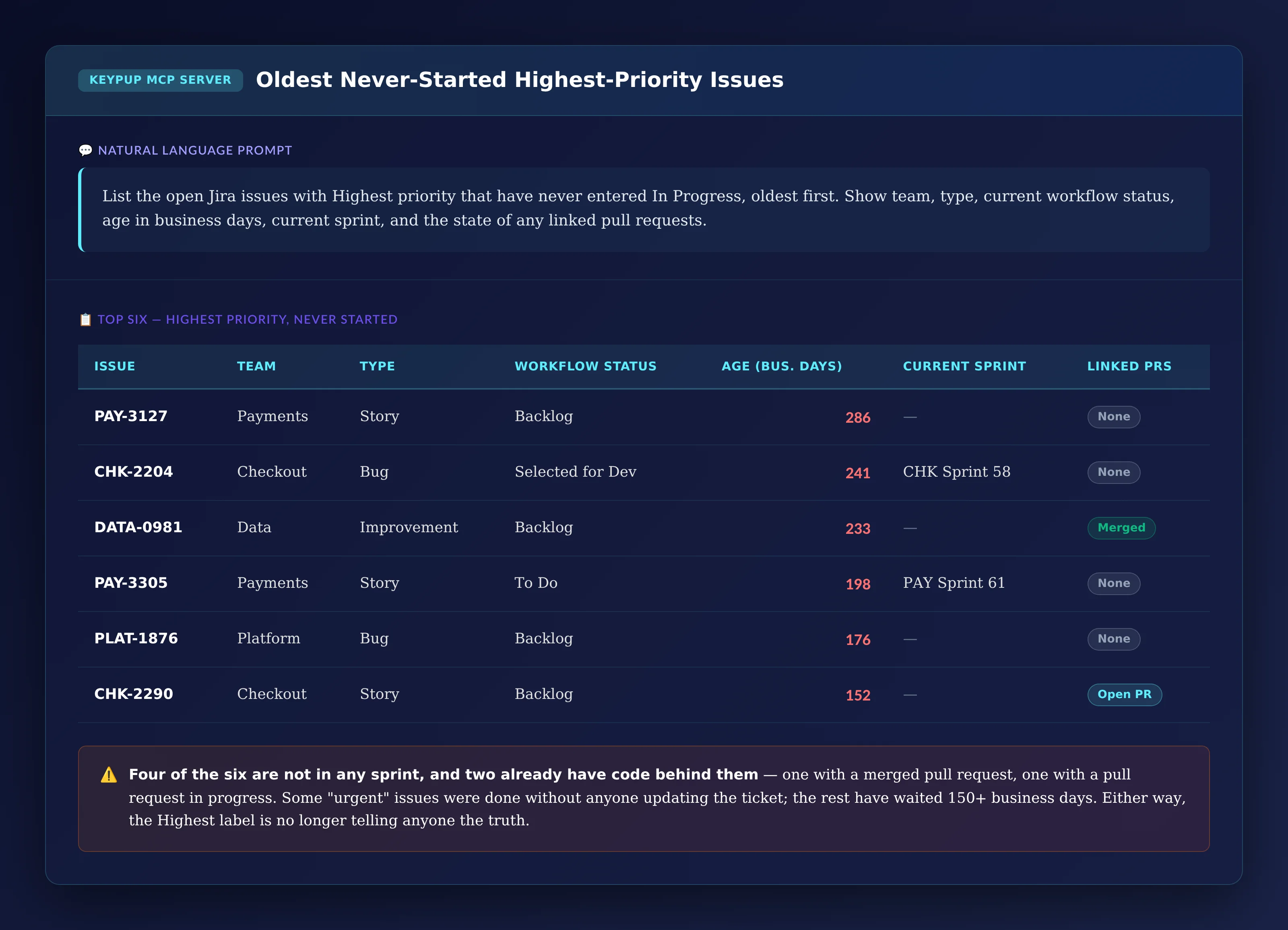
MCP Prompt:
List the open Jira issues with Highest priority that have never
entered In Progress, oldest first. Show team, type, current
workflow status, age in business days, current sprint, and the
state of any linked pull requests.
Key Insight: Four of the six are not in any sprint, and two already have code behind them — one with a merged pull request, one with a pull request in progress, even though the issue never moved to In Progress. Some "urgent" issues were done without anyone updating the ticket; the rest have waited more than 150 business days. Either way, the Highest label is no longer telling anyone the truth.
The Technical Implementation: What Keypup MCP Actually Reads
Every number above comes from data Keypup already imports from Jira and your Git platform. It helps to be precise about what that data is — and what it isn't.
Priority Comes From the Jira Priority Field
Keypup imports the Jira Priority field with every issue, using your own priority names. The prompts use Jira's default levels (Highest, High, Medium, Low, Lowest); if your organization uses P1–P4 or custom names, use those in your prompts. Keypup reads the current priority of each issue — it does not keep a history of priority changes — so the mix-over-time view groups issues by when they were created and by the priority they hold today.
Wait Time and Work Time Come From the Workflow Timeline
For every Jira issue, Keypup stores a workflow timeline: each status the issue entered, in order, with the time it entered and left it. Wait to start is the business days from the issue's creation to the first time it entered In Progress. Work time is the business days the issue spent in In Progress. "Never started" means the issue has no In Progress entry in its timeline. If your workflow uses a different name for active development — "In Development" or "Doing" — use that name in the prompts.
Age Is Measured in Business Days
The age of an open issue is the business days from its creation to today, using a standard Monday-to-Friday, 9-to-5 schedule by default. You can ask for a different time zone or working week in the prompt.
Teams, Sprints and Linked Pull Requests
Grouping by team uses your Jira Team field (or whichever custom field you use to assign issues to teams), so the team view only works if that field is filled in consistently. The current sprint comes from Jira's sprint field. The linked pull request state shows whether the pull requests linked to an issue are open or merged; it depends on your engineers referencing Jira issue keys in their pull requests, and issues without a reference show "None" even if code was written for them.
Real-World Impact: Enterprise Case Studies
Case Study 1: Global Insurance Group
Before Keypup MCP:
Eleven teams shared one Jira instance; more than half of new issues were filed as High or Highest
Business stakeholders escalated through managers because "High doesn't mean anything anymore"
Backlog reviews took a full afternoon and still ended with everything at the top
After Keypup MCP:
The wait-versus-work view showed High and Medium issues waited almost the same time to start, which ended the debate about whether priority still worked
The organization introduced a cap: no more than 20% of a team's open issues at High or above, checked in every monthly delivery review
Within two quarters, top-priority share fell from 57% to 24%, and the median wait to start for High issues dropped from 11 to 4 business days
"Everyone agreed priority was broken, but nobody could show it. Once we saw High and Medium waiting the same eleven days, the conversation changed from 'whose work is more urgent' to 'how do we make the label mean something again'."
— CTO, Global Insurance Group
Case Study 2: Enterprise Logistics Software Provider
Before Keypup MCP:
The backlog held more than 600 open Highest issues, many over a year old
Teams avoided closing old Highest issues in case one turned out to matter
New urgent requests competed with hundreds of stale ones
After Keypup MCP:
The priority × age heatmap and the oldest-issues list became the agenda for a one-off backlog clean-up, team by team
Issues with a merged pull request were closed immediately; the rest were re-ranked or closed with a note to the requester
Open Highest issues fell from over 600 to under 80, and every remaining one had an owner and a sprint
"The list showed us that dozens of our oldest 'urgent' issues had already been fixed — the code was merged, the ticket was just never moved. The rest we could finally discuss one by one, instead of arguing about the whole backlog at once."
Connect Jira and GitHub, GitLab or Bitbucket to Keypup. Priorities, workflow status histories, sprints, custom fields and pull request links are imported automatically.
2. Confirm Your Priority and Status Names
List the priority levels and the "in development" status names your teams use. Use those exact names in your prompts so wait time, work time and never-started issues are calculated correctly.
3. Check Your Field and Linking Hygiene
Confirm your teams fill in the Team field and that pull requests reference Jira issue keys. These two habits decide how precise the team view and the linked pull request check can be.
4. Connect the MCP Server to Your AI Assistant
Follow the MCP documentation to connect Keypup to Claude, ChatGPT, Cursor or any MCP-compatible assistant.
5. Set a Baseline and a Rule
Run the sizing and mix-over-time prompts to set a baseline. Then agree on a simple rule — for example, a cap on the share of open issues at High or above — and bring the heatmap and the oldest-issues list to every backlog review, so the scale doesn't drift back.
Frequently Asked Questions
What is priority inflation in software development?
Priority inflation is when the share of work marked top priority keeps growing until priority stops deciding what gets done first. It usually happens gradually, as requesters learn that higher priority gets faster attention.
How do you measure priority inflation in Jira?
Look at the share of new issues created at each priority level over time, and compare the median wait from creation to first In Progress at each level. If the top levels keep growing and High waits about as long as Medium, priority has inflated. Keypup MCP computes both from the Jira Priority field and the workflow timeline.
What is a healthy share of high-priority issues?
There is no universal benchmark. Many organizations aim to keep the top two levels well under a third of open work, but the most useful signal is your own trend and whether higher priority still means a faster start.
Should we close old high-priority issues?
Review them, don't bulk-close them. Check for linked pull requests that are already merged (the work may be done), then re-rank or close the rest with a note to the requester. An issue that has waited months without being started is, in practice, not a top priority.
The Bottom Line
Priority inflation quietly breaks the one field meant to tell teams what to do next. Keypup MCP turns it into numbers every leader can act on:
✅ Sizing the problem — top-priority share, never-started urgent issues and wait time by level ✅ Proving the drift — priority mix by quarter of creation ✅ Showing where time goes — waiting versus working at each priority ✅ Mapping the stale backlog — never-started issues by priority and age ✅ Comparing teams, so the clean-up starts where it matters most ✅ Listing the oldest "urgent" issues for every backlog review
When leaders can see that High no longer means "next", they can stop arguing about urgency and fix the scale.
Get Started
Ready to find out whether your priority field still means anything?
Start Free Trial — Connect Jira and your Git platform in minutes and measure your priority mix today.
Request Demo — See how enterprise engineering leaders use Keypup MCP to turn "everything is P1" into a measurable, fixable metric.
View MCP Documentation — Technical details for engineering teams connecting Keypup MCP to Jira and their Git platform.
Keywords: priority inflation, everything is P1, Jira priority, backlog prioritization, priority creep, stale backlog, wait time, cycle time, backlog grooming, engineering prioritization, MCP server engineering analytics
Ready to Transform Your Analytics?
Join teams already using AI to make data-driven decisions faster than
ever.
Your median cycle time looks healthy, yet every release still ends in merge conflicts, rebases and big-bang reviews. Learn what engineering leaders on Reddit say about long-lived branches and the trunk-based vs GitFlow debate at enterprise scale, and how Keypup MCP uses pull request dates, target branches, commits, reviews and mergeability to measure branch lifetime, find where branches live longest and land aging work before it drifts into conflict.
Compare the 6 best engineering metrics tools for multi-team benchmarking in 2026 — Keypup, LinearB, Swarmia, Jellyfish, Faros and Appfire Flow — on cross-team benchmarking, org-level rollups, DORA Metrics, Git-to-ticketing linking, custom KPIs, AI capabilities and data security. See how to compare teams on equal terms and find where your delivery process is broken.
In large engineering organizations, thousands of pull requests are closed without merging or left to go stale every year, and nobody measures the cost. Learn what engineering leaders on Reddit say about abandoned pull requests, and how Keypup MCP uses pull request state, review, size, mergeability and Jira link data to size the PR graveyard, find where work dies, and triage stale pull requests before they are lost.